
Never miss an important customer, supplier or project email again, use Outlook conditional formating..
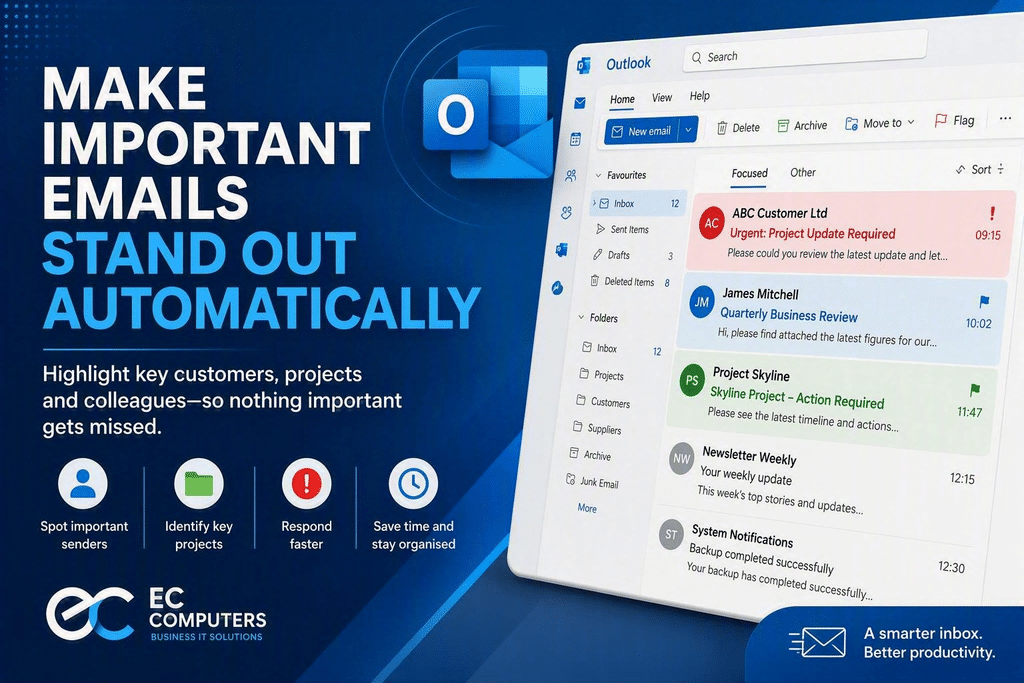
Make Important Emails Stand Out Automatically in Outlook
We’ve all experienced it. An important customer email arrives, gets buried beneath newsletters, automated notifications and internal messages, and isn’t noticed until hours later.
If your inbox receives a high volume of emails every day, Microsoft Outlook includes a simple feature that can help important messages stand out instantly: Conditional Formatting. This feature allows Outlook to automatically change the appearance of emails from specific people or about specific topics, making them easier to spot at a glance.
Why This Matters
For many businesses, email remains the primary method of communication with customers, suppliers and colleagues. When inboxes become crowded, important emails can easily be overlooked.
Conditional Formatting helps by:
- Highlighting emails from key customers
- Making manager or director messages stand out
- Identifying project-related communications
- Drawing attention to urgent or business-critical senders
- Reducing the chance of missing important correspondence
Unlike folders or email rules that move messages elsewhere, Conditional Formatting leaves emails in your inbox but changes how they appear.
How Does It Work?
Outlook can automatically apply colours, fonts or formatting based on criteria you choose.
For example, you could:
Highlight VIP Customers
Display emails from your biggest customer in red so they immediately catch your attention.
Monitor Key Projects
Make emails containing a project name appear in a different colour.
Prioritise Management Communications
Ensure messages from directors, managers or team leaders are easy to identify.
Track Important Suppliers
Highlight emails from critical vendors or service providers.
The formatting is applied automatically whenever a matching email arrives.
Benefits for Small Businesses
Faster Response Times
Important messages are easier to find, helping you respond more quickly to customers and prospects.
Improved Productivity
Spend less time sorting through email and more time focusing on business priorities.
Better Customer Service
Reduce the risk of missing customer enquiries or urgent requests.
Less Inbox Stress
A visually organised inbox is easier to manage than scrolling through hundreds of nearly identical messages.
Outlook Is Full of Hidden Productivity Features
Conditional Formatting is one of many useful features included with Microsoft 365 that many businesses never fully utilise.
Other valuable Outlook tools include:
- Focused Inbox
- Email Categories
- Quick Steps
- Rules and Automation
- Sweep
- Shared Mailboxes
- Calendar Management
When configured correctly, these features can save hours of administration every month.
Let EC Computers Help You Get More from Microsoft 365
Many organisations are only using a fraction of the tools available within Microsoft 365. Our team helps businesses across Bristol and the South West improve productivity, strengthen security and streamline their day-to-day operations.
Whether you need Outlook training, Microsoft 365 support, email management advice or a complete IT review, we’re here to help.