
If you use Microsoft 365 Family or Premium at home, there’s an important change to OneDrive storage that’s worth knowing about.
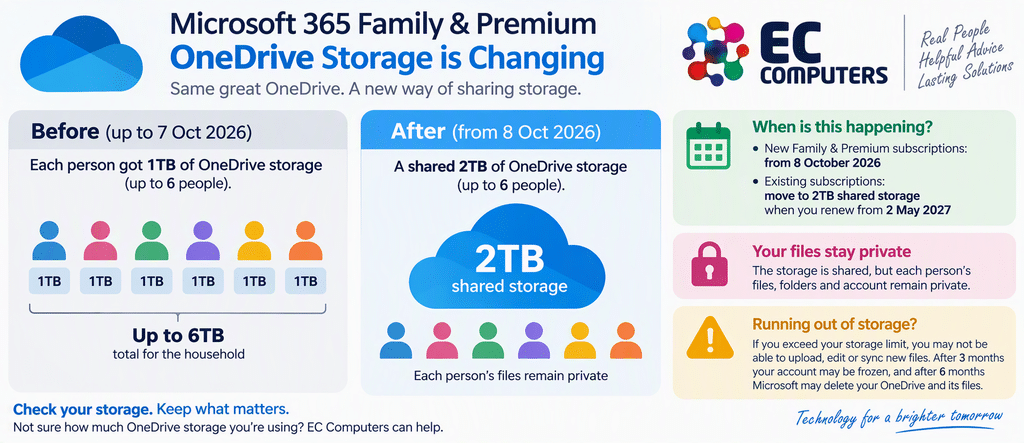
Microsoft is moving away from providing each family member with their own 1TB allowance and introducing a shared storage allowance instead. For families with several people using lots of OneDrive space, that could make quite a difference.
The good news is that there’s no need to panic. Your files aren’t suddenly being combined with everybody else’s, and for many households the new allowance may still be plenty.
What’s changing?
Under the previous Microsoft 365 Family arrangement, up to six people could each receive 1TB of OneDrive storage, potentially providing as much as 6TB across the household.
Microsoft’s new model provides:
Microsoft 365 Family and Premium
- 2TB of shared OneDrive cloud storage
- Shared between up to six people
Microsoft 365 Pro
- 5TB of shared OneDrive cloud storage
- Shared between up to six people
Each person’s files and folders remain private, despite the storage allowance being shared.
A simple example
Imagine a family of four:
Previously
| Person | OneDrive allowance |
|---|---|
| Person 1 | 1TB |
| Person 2 | 1TB |
| Person 3 | 1TB |
| Person 4 | 1TB |
| Potential total | 4TB |
Under the new Family arrangement
Those four people will instead share a combined 2TB allowance.
That doesn’t mean everyone receives exactly 500GB. It’s a shared overall allowance.
When is this happening?
The dates depend on whether you’re buying a new subscription or already have one.
Microsoft says:
- New Microsoft 365 Family and Premium subscriptions from 8 October 2026: 2TB shared storage.
- Existing Family and Premium subscriptions: move to 2TB shared storage when renewing from 2 May 2027.
- New Microsoft 365 Pro subscriptions from 8 October 2026: 5TB shared storage.
- Existing Microsoft 365 Pro subscriptions: move to 5TB shared storage from 1 November 2027.
So if you already have Microsoft 365 Family, you don’t necessarily need to do anything immediately.
Does everyone get access to my files?
No.
This is probably the most important reassurance.
While the storage allowance is shared, Microsoft states that each person’s mailbox, files and folders remain private.
Think of it as sharing the overall capacity rather than sharing the contents.
Will the change affect you?
For many households, probably not.
If your whole family is comfortably using less than 2TB between you, the practical difference may be relatively small.
It becomes more important if several people have large OneDrive libraries containing things such as:
- Photos and videos
- Phone camera backups
- Large personal document collections
- Creative projects
- Years of accumulated files
This is particularly worth checking before your subscription moves onto the new allowance.
What happens if you run out of OneDrive storage?
This is where you shouldn’t simply ignore the warnings.
Microsoft says that if you exceed your applicable cloud storage allowance, OneDrive can prevent you from uploading, editing or synchronising new files, with existing files becoming read-only.
Microsoft also says that an account remaining over its OneDrive storage limit for three months can be frozen and that, after six months, Microsoft may delete the OneDrive and its files.
So if Microsoft tells you you’re approaching the limit, it’s worth dealing with it rather than continually dismissing the notification.
What should you do now?
Our advice is simple:
1. Check how much OneDrive storage you’re actually using
Before worrying about the headline numbers, find out whether your household is actually anywhere near the new allowance.
2. Look for unnecessary large files
Old videos, duplicated photographs and files you no longer need can quietly consume a surprising amount of cloud storage.
3. Don’t delete things blindly
Be careful when clearing OneDrive.
OneDrive synchronises your information between the cloud and your devices, so deleting something isn’t necessarily the same as simply removing a local copy from your computer.
4. Consider whether you need additional storage
Microsoft says Personal, Family, Premium and Pro subscriptions can be extended with additional OneDrive storage if required.
5. Remember that cloud storage isn’t the same as backup
This is the point we think is particularly important.
OneDrive is excellent for synchronising files, making them available across devices and helping you work in the cloud.
But we’d still recommend keeping a proper backup of photographs, documents and other files that are genuinely irreplaceable.
Does this affect Microsoft 365 Business users?
Not in the same way.
Microsoft’s published business OneDrive allowances continue to list 1TB per user for Microsoft 365 Business Basic, Business Standard and Business Premium.
So if you use Microsoft 365 through your employer or your business has a properly managed Microsoft 365 tenant, don’t assume this Family/Premium announcement means your business OneDrive allowance is being cut to 2TB shared.
This particular change is about Microsoft’s consumer subscriptions.
The bottom line
The headline“Microsoft cuts OneDrive storage by up to 4TB” sounds dramatic, but it doesn’t tell the whole story.
For Microsoft 365 Family and Premium users, the key change is that Microsoft is moving from individual 1TB allowances to 2TB of shared storage for the subscription.
If your household doesn’t use anywhere near 2TB, you may notice very little difference.
If several family members store large photo, video or document collections in OneDrive, however, it’s worth checking your usage well before the new limits affect your subscription.
Need help checking your storage?
Not sure how much OneDrive storage you’re using, what’s taking up the space, or whether you need to do anything?
EC Computers can help you review your OneDrive setup, understand what you’re using and make sure important files are properly protected before making any changes, contact our team here or by calling 0117 200 1000
Sources & further reading
This article was prepared using information published by Microsoft and independent industry reporting. Storage allowances and subscription terms can change, so we recommend checking Microsoft’s latest information for your particular subscription.
- Microsoft Support – Microsoft storage quotas
Official information covering Microsoft 365 consumer cloud-storage allowances, including the changes to Family, Premium and Pro subscriptions. [Microsoft…age quotas] - Microsoft Learn – OneDrive for Business service description
Official information covering OneDrive storage allowances for Microsoft 365 Business and Enterprise subscriptions. [OneDrive s…escription] - Microsoft Support – Microsoft storage FAQs
Further guidance on Microsoft cloud storage, subscriptions and purchasing additional storage. [Microsoft…orage FAQs]
Information checked 14 October 2026.